Company Dispatch Telex Revamped: Meet AALOPS
Greetings AAVA Crews!
When we introduced Stratos back in April, we mentioned our automated Company Dispatch functionality and promised that more was coming. Today we are pleased to announce that the Company Dispatch Telex system has been completely revamped, and it now has a name: AALOPS.
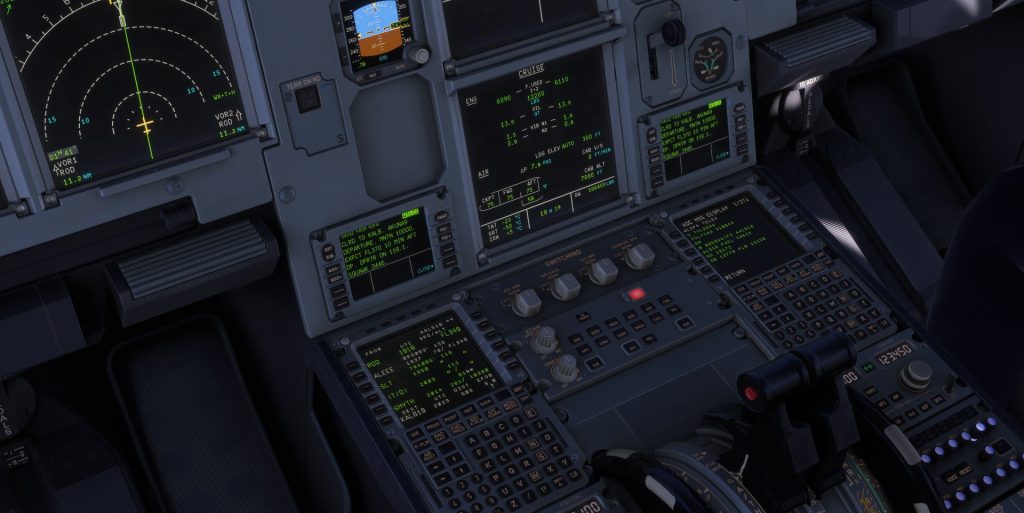
Your Dispatch Office, in the Cockpit
At a real airline, the crew is never alone: a dispatcher plans the flight, sends the paperwork to the cockpit, and keeps an eye on it until it is at the gate. AALOPS is American Virtual’s dispatch office, and it now does exactly that. It follows your flight live through Stratos and talks to you by telex over the SayIntentions ACARS network, straight to your MCDU, on every flight.
Depending on the phase of flight, AALOPS sends you:
- The Release: aircraft, route, flight level, fuel, alternates and the aircraft’s tech log, ending with SIGN RELEASE BY TELEX.
- The Loadsheet: passengers, cargo and weights, with a PRELIM first and the FINAL once loading is complete.
- Takeoff Performance (TPS): V-speeds, flaps and flex for your runway, laid out like a real AA card.
- En route updates: climb and cruise progress, fuel advisories, and a descent package with live weather, ATIS, runways in use and your ETA.
- Operations notices: OCC spare aircraft assignments, runway and gate changes, and the ARR REPORT after landing.
It works both ways. You can ask dispatch for the weather at your destination, your arrival gate, your fuel against the plan, your ETA, or the aircraft’s current MEL and tech-log status, and you can write up a defect that goes straight into the aircraft’s tech log on the new TechLog fleet board.
Fly a Clean Flight
Answer dispatch the way a real crew does and your flight is clean, earning +500 AAdvantage Miles and +30 minutes of bonus time. It takes four messages, all sent TO: AALOPS:
- SIGN AALXXXX at the gate, once the Release arrives (your pilot ID).
- TPS 28 (your runway) before pushback, to request your takeoff data.
- ACCEPT XXXX after checking the TPS, using the number on its last line.
- BRK 5 ARR FUEL 6100 after landing, in one message: your braking action code and fuel on board.
If dispatch ever sends PLZ ACK MSG XXXX, reply ACK XXXX. Most flights never get one. Wait for the ARR REPORT reply before you file your PIREP.
What You Need
- SayIntentions, used once. No subscription is needed. Open the free trial, install the app and fly one flight with it.
- Your aircraft’s ACARS set to SayIntentions. Each aircraft does this differently, and the guide covers each one.
- The MCDU flight number must exactly match your bid callsign, for example AVC8619, not AAL8619 or 8619. Otherwise no telex reaches you.
- Start Stratos at the gate, before fueling and boarding. The Release arrives 2 to 3 minutes later.
- Be patient. Telexes travel through the ACARS network, so replies can take up to a couple of minutes.
Supported Aircraft
AALOPS supports the Fenix A319/A320/A321, the FlyByWire A32NX, the FSLabs A321 and the Leonardo Maddog. PMDG 737 crews receive telexes on the CDU and answer dispatch from the ACARS tab of the American Virtual toolbar app.
The PMDG 777, Bluebird 757, iniBuilds A350 and iniBuilds A300-600 receive telexes but cannot send free text. Crews with an active SayIntentions subscription can reply from the PocketSky app, which makes a clean flight possible in those aircraft too. A350 crews can also send their own calculated takeoff numbers with the TPS request; dispatch checks them for plausibility and returns them marked CREW CALC.
Read the Guides
Everything you need, including the one-time setup for each aircraft, the full list of messages and real screens from a Fenix flight from gate to takeoff, is in the AALOPS Dispatch and AALOPS Clean Flight guides in the CrewCenter Pilot Guides module. We strongly recommend reading both before your next flight.
https://crew.americanva.net/guides
Sign your release, accept your numbers, and enjoy flying with a dispatcher in your corner. See you on the line!


About The Author
