TechLog Is Live: Every Airbus and Boeing 737 Now Has Its Own Tech Log
Greetings AAVA Crews!
TechLog is now live across our narrowbody fleet. Since October 31, every American Airlines A319, A320 and A321 has been a real aircraft with its own history, and as of November 3 all 367 of our 737-800s and 737 MAX 8s have their own tech log too.
Every Tail Has a Story
TechLog works like the tech log book in a real aircraft: the crew before you writes down what is wrong, and you see it before you fly. For every tail it keeps track of:
- Where it is: an aircraft is where it last landed, and it moves when you file your PIREP.
- Open defects: what the MEL (Minimum Equipment List) allows us to fly with.
- Its condition: engines, APU, tyres, brakes, cabin and fluids, worn by the flights we actually fly.
- Its maintenance: repairs, A- and C-checks and replaced parts.
TechLog never touches your simulator. It does not set failures and does not write anything into your aircraft.
Check the Colour Before You Fly
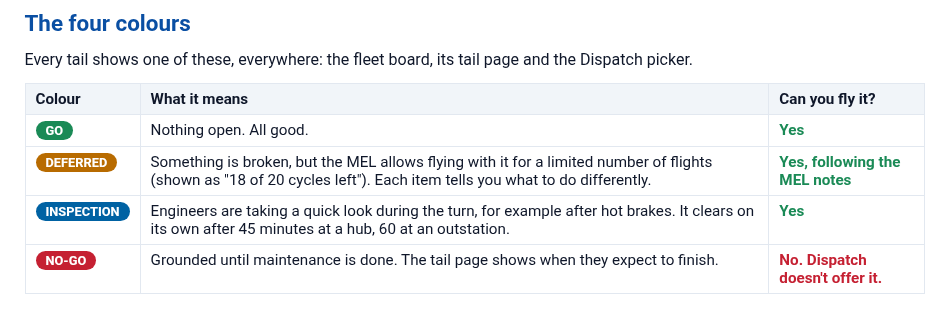
Every tail shows one of four colours on the fleet board, its tail page and in Dispatch.
- GO: nothing open, all good.
- DEFERRED: something is broken, but the MEL allows flying with it for a limited number of flights. Each item tells you what to do differently.
- INSPECTION: engineers are taking a quick look during the turn, for example after hot brakes. You can still fly it.
- NO-GO: grounded until maintenance is done. Dispatch does not offer it.
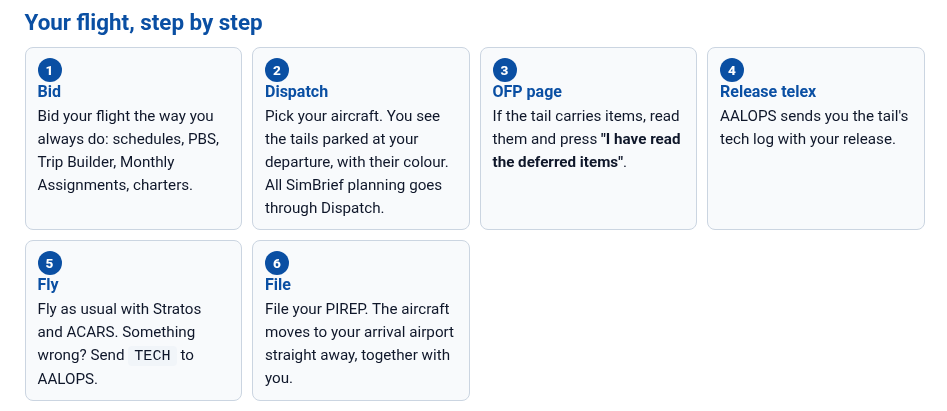
Your Flight, Step by Step
In Dispatch you pick from the aircraft parked at your departure airport. If the tail carries deferred items, read them on the OFP page and confirm before you go, and your AALOPS release telex lists them too. After you land and file, the aircraft is at your arrival airport, ready for the next pilot.
No aircraft of your type at your airport? Jumpseat to a nearby airport that has aircraft, or press Req OCC spare and Operations Control positions one for you. It is yours alone, and you have 12 hours to fly it.
Now Live for the Boeing 737 Fleet
- The 737 fleet has its own board tab (All, A32x and 737), real tail pages with a proper Boeing drawing, and 737 cabin items.
- Real Boeing MELs for the 737-800 (FAA MMEL Rev 63a) and the 737 MAX 8 (FAA MMEL Rev 7), next to the A320 book. Switch books at the top of the MEL page.
- OCC spares and the Ferry board work for the 737 too, along with NAV DB tracking and Needs flying.
- Write up defects in Boeing words, such as
TECH BLEED TRIP OFF,TECH GEN OFF BUSorTECH PACK TRIP OFF.
Serious events ground an aircraft for an inspection on every type, including fire, smoke or fumes, an engine failure, a bird or lightning strike and a burst tyre. Hard landings, possible tail strikes and overweight landings found in your flight data do the same, so fly it like it is your own.
Report It: TECH
Something failed and stayed failed? Send TECH plus what is wrong to AALOPS by ACARS, for example TECH PACK 2 FAULT, RESET UNSUCCESSFUL, or write it in your Stratos PIREP comment the way you would in a real tech log. Maintenance control matches your words to the right MEL item, so one defect per message works best.
Earn Extra Hours and Miles
- Ferry board: fly a ferry for your normal flight time plus a 1-hour bonus and 1,000 AAdvantage Miles (2,000 for the delivery of a brand-new aircraft). Fly it as an AALOPS clean flight too and the bonuses add up to +1h 30m.
- Needs flying: the first pilot to fly a tail that has sat unflown for 14 days earns +500 AAdvantage Miles.
- NAV DB due: bring in a tail that is still on last month’s navigation database and earn +250 AAdvantage Miles. It still flies as DEFERRED.
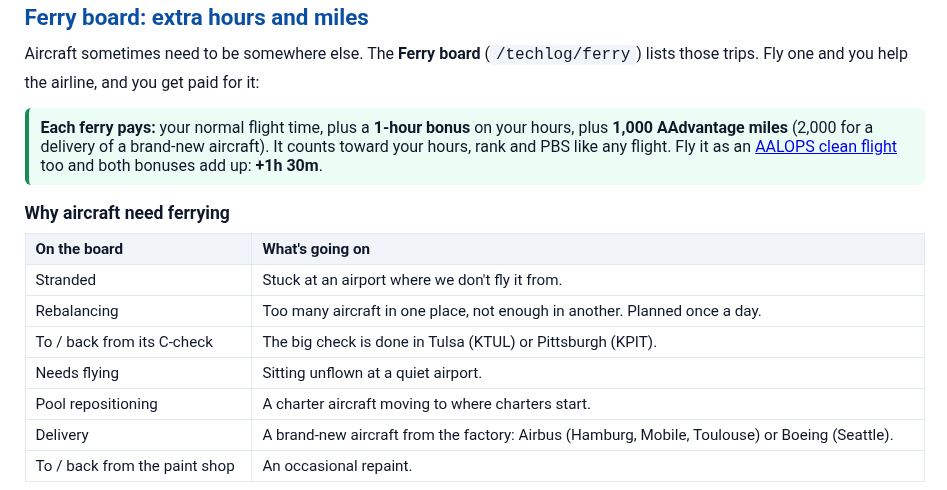
Manual PIREPs do not earn AAdvantage Miles. A ferry is flown one at a time and must be flown within 12 hours of claiming it.
Updated Company Dispatch for Boeings
Boeings flying with AALOPS (the PMDG 737, iFly 737 MAX 8, BlueBird 757 and iniBuilds A350) cannot send a free-text telex, so you answer dispatch from the ACARS tab of our toolbar app. What changes is where you read the telexes and where your takeoff numbers come from. Full steps for each aircraft are in the AALOPS Clean Flight guide and the AALOPS Dispatch guide.
Read the Guide
The TechLog Pilot Guide is a five-minute read. You can find TechLog in the CrewCenter under Resources, TechLog, and all our guides under Resources, Pilot Guides. The TechLog, Dispatch Center, AALOPS Dispatch and AALOPS Clean Flight guides were all updated for the 737 launch. Questions? Open a Pilot Support ticket or ask your hub team.
Grab a 737 and enjoy the new fleet. Happy flying!

About The Author
